
WhatFlow helps online merchants automate order confirmations, abandoned cart recovery, fulfillment updates, and cancellations via WhatsApp

category:

Development

services:

WordPress, HTML

Date:

November 22, 2023

team:

Developer – Anna Lee
Designer – Tim Willson

WhatFlow simplifies order management by automating order confirmations, abandoned cart recovery, fulfillment updates, and cancellations directly via WhatsApp. It sends confirmation polls to customers and automatically updates order tags based on their responses, helping merchants efficiently track confirmed and canceled orders. Integrated seamlessly with Shopify, WhatFlow allows merchants to manage orders and customer engagement directly from their dashboard—saving time and reducing manual work.

Automatically send confirmation messages to customers via WhatsApp.
Reach out to customers who abandoned their checkouts with automated reminders.
Keep customers informed with real-time updates on shipping and delivery status.
Manage orders and track customer responses directly from your Shopify dashboard.
No complex API setup, connect in minutes using WhatsApp’s “link a device”.

WhatFlow helps online merchants automate order confirmations, abandoned cart recovery, fulfillment updates, and cancellations via WhatsApp

category:

Development

services:

WordPress, HTML

Date:

November 22, 2023

team:

Developer – Anna Lee
Designer – Tim Willson

WhatFlow simplifies order management by automating order confirmations, abandoned cart recovery, fulfillment updates, and cancellations directly via WhatsApp. It sends confirmation polls to customers and automatically updates order tags based on their responses, helping merchants efficiently track confirmed and canceled orders. Integrated seamlessly with Shopify, WhatFlow allows merchants to manage orders and customer engagement directly from their dashboard—saving time and reducing manual work.

Automatically send confirmation messages to customers via WhatsApp.
Reach out to customers who abandoned their checkouts with automated reminders.
Keep customers informed with real-time updates on shipping and delivery status.
Manage orders and track customer responses directly from your Shopify dashboard.
No complex API setup, connect in minutes using WhatsApp’s “link a device”.

WhatFlow helps online merchants automate order confirmations, abandoned cart recovery, fulfillment updates, and cancellations via WhatsApp

category:

Development

services:

WordPress, HTML

Date:

November 22, 2023

team:

Developer – Anna Lee
Designer – Tim Willson

WhatFlow simplifies order management by automating order confirmations, abandoned cart recovery, fulfillment updates, and cancellations directly via WhatsApp. It sends confirmation polls to customers and automatically updates order tags based on their responses, helping merchants efficiently track confirmed and canceled orders. Integrated seamlessly with Shopify, WhatFlow allows merchants to manage orders and customer engagement directly from their dashboard—saving time and reducing manual work.

Automatically send confirmation messages to customers via WhatsApp.
Reach out to customers who abandoned their checkouts with automated reminders.
Keep customers informed with real-time updates on shipping and delivery status.
Manage orders and track customer responses directly from your Shopify dashboard.
No complex API setup, connect in minutes using WhatsApp’s “link a device”.

Category AI

Gemini, the powerful AI overlay, is making multitasking easier with a new split-screen shortcut now available on Android tablets and foldable devices. This feature was initially introduced for Samsung’s latest foldable phones, and it’s now accessible on Google’s Pixel Tablet and other Android foldables, enhancing the user experience with seamless side-by-side interactions.

How Gemini’s Split-Screen Mode Works

The new split-screen functionality is designed to maximize productivity on large-screen Android devices. Here’s how it works:

  • Split-Screen Access: Gemini adds a centered handlebar at the top edge of the screen. By dragging this handle, you can activate the split-screen, allowing Gemini to be side-by-side with any other app. You can choose your layout, positioning Gemini on the left, right, top, or bottom.
  • Improved Accessibility: This layout makes it easy to interact with Gemini while reading, watching, or using other apps without switching screens. Imagine reading an article or watching a video and needing quick answers—Gemini can now be accessed instantly without interrupting your primary activity.

Expanded Availability Across Devices
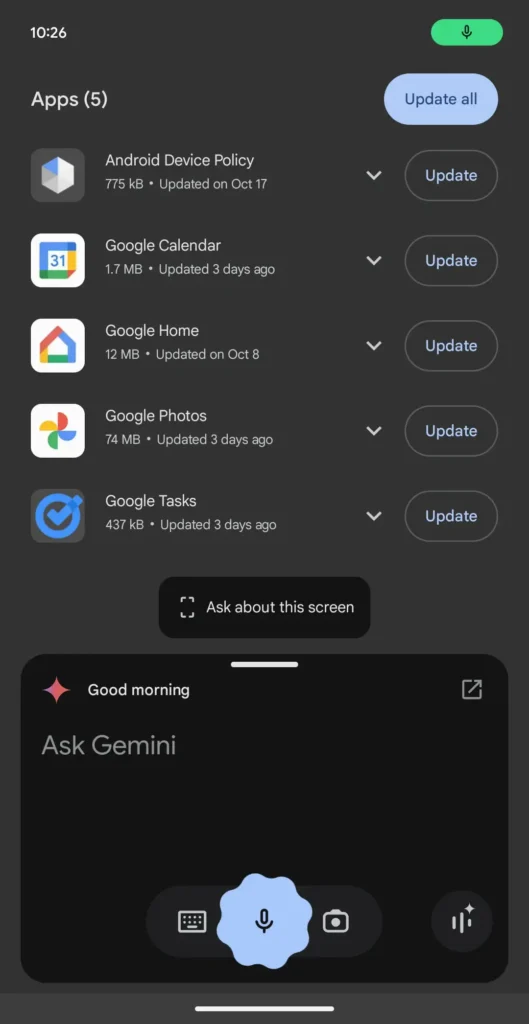
Previously, this split-screen functionality was only available on Samsung foldables. Today, the feature has rolled out to other large-screen Android devices like the Pixel Tablet and other foldable models. It’s worth noting, however, that Android phones don’t support this feature yet.

Why This Feature Matters

For Android users who rely on multitasking, this split-screen addition brings Gemini’s power closer to their fingertips, enabling smoother productivity and efficiency on tablets and foldable devices. If you’re frequently using large-screen Android devices, this split-screen tool might be a game-changer.

Stay tuned for more updates on https://coderog.com/ and other productivity-enhancing tools!

Leave a Reply

Your email address will not be published. Required fields are marked *

top
Select the fields to be shown. Others will be hidden. Drag and drop to rearrange the order.
  • Image
  • SKU
  • Rating
  • Price
  • Stock
  • Availability
  • Add to cart
  • Description
  • Content
  • Weight
  • Dimensions
  • Additional information
Click outside to hide the comparison bar
Compare
Compare ×
Let's Compare! Continue shopping

Inactive

Simplifying IT
for a complex world.
Platform partnerships