
When your (CPT) custom post type not showing in tag archive You need to follow a few steps to solve that.
The Situation
I created a Custom Post Type, which, from here I will call CPT, using the CPT UI plugin. Please note that in this case it doesn’t matter which plugin you use to create that CPT. It could also have been Pods or Toolset.
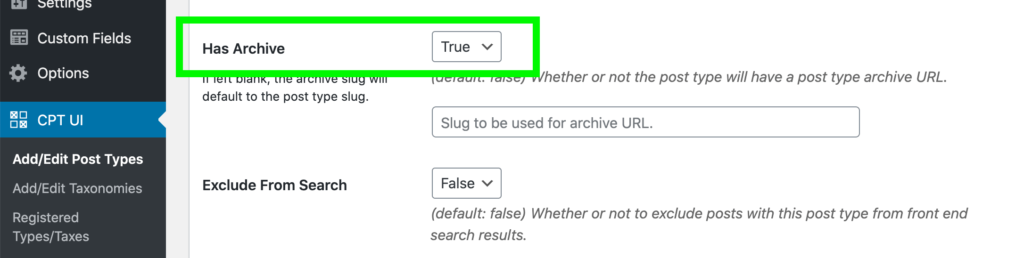
Connected taxonomies I set to include the default WordPress categories and tags:
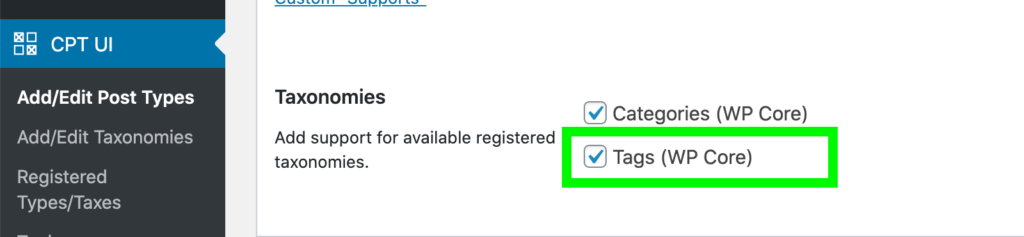
… and then my tag links just didn’t show the tutorials with the tags. They only showed regular posts.
Steps to solve it
- Add the code snippet below to your functions.php. Either in a child theme, or if you don’t have a child theme, I recommend you install a free plugin called Code Snippets, and put it there.
- Where the code says custom_post_type, replace that with the name of your own custom post type.
add_action( 'pre_get_posts', function ( $q )
{
    if (  !is_admin() // Only target front end queries
          && $q->is_main_query() // Only target the main query
          && $q->is_tag()        // Only target tag archives
    ) {
        $q->set( 'post_type', ['post', 'custom_post_type'] ); // Change 'custom_post_type' to YOUR Custom Post Type
                                                              // You can add multiple CPT's separated by comma's
    }
});
Helpful resources
It was this documentation page of the Pods plugin, where I found the code snippet. They go a bit more in-depth about it, than I do here.