
WhatFlow helps online merchants automate order confirmations, abandoned cart recovery, fulfillment updates, and cancellations via WhatsApp

category:

Development

services:

WordPress, HTML

Date:

November 22, 2023

team:

Developer – Anna Lee
Designer – Tim Willson

WhatFlow simplifies order management by automating order confirmations, abandoned cart recovery, fulfillment updates, and cancellations directly via WhatsApp. It sends confirmation polls to customers and automatically updates order tags based on their responses, helping merchants efficiently track confirmed and canceled orders. Integrated seamlessly with Shopify, WhatFlow allows merchants to manage orders and customer engagement directly from their dashboard—saving time and reducing manual work.

Automatically send confirmation messages to customers via WhatsApp.
Reach out to customers who abandoned their checkouts with automated reminders.
Keep customers informed with real-time updates on shipping and delivery status.
Manage orders and track customer responses directly from your Shopify dashboard.
No complex API setup, connect in minutes using WhatsApp’s “link a device”.

WhatFlow helps online merchants automate order confirmations, abandoned cart recovery, fulfillment updates, and cancellations via WhatsApp

category:

Development

services:

WordPress, HTML

Date:

November 22, 2023

team:

Developer – Anna Lee
Designer – Tim Willson

WhatFlow simplifies order management by automating order confirmations, abandoned cart recovery, fulfillment updates, and cancellations directly via WhatsApp. It sends confirmation polls to customers and automatically updates order tags based on their responses, helping merchants efficiently track confirmed and canceled orders. Integrated seamlessly with Shopify, WhatFlow allows merchants to manage orders and customer engagement directly from their dashboard—saving time and reducing manual work.

Automatically send confirmation messages to customers via WhatsApp.
Reach out to customers who abandoned their checkouts with automated reminders.
Keep customers informed with real-time updates on shipping and delivery status.
Manage orders and track customer responses directly from your Shopify dashboard.
No complex API setup, connect in minutes using WhatsApp’s “link a device”.

WhatFlow helps online merchants automate order confirmations, abandoned cart recovery, fulfillment updates, and cancellations via WhatsApp

category:

Development

services:

WordPress, HTML

Date:

November 22, 2023

team:

Developer – Anna Lee
Designer – Tim Willson

WhatFlow simplifies order management by automating order confirmations, abandoned cart recovery, fulfillment updates, and cancellations directly via WhatsApp. It sends confirmation polls to customers and automatically updates order tags based on their responses, helping merchants efficiently track confirmed and canceled orders. Integrated seamlessly with Shopify, WhatFlow allows merchants to manage orders and customer engagement directly from their dashboard—saving time and reducing manual work.

Automatically send confirmation messages to customers via WhatsApp.
Reach out to customers who abandoned their checkouts with automated reminders.
Keep customers informed with real-time updates on shipping and delivery status.
Manage orders and track customer responses directly from your Shopify dashboard.
No complex API setup, connect in minutes using WhatsApp’s “link a device”.

Category WordPress
How To Remove Category Base from URLs in WordPress

I was trying to work out how to remove /category/ from my category URLs and I just couldn’t seem to remove it. For example mydomain.com/category/wordpress. I just wanted to be mydomain.com/wordpress , but I found out a quick trick to achieve this.

To get rid of category you set your permalinks to /%category%/%postname%/ and then set the Category Base to period/dot.

*If you leave the category base blank it will display the wordpress default category.*

  1. Go to Setting > Permalinks
  2. Select Custom Structure
  3. Add /%category%/%postname%/ after your domain
  4. Change Category Base to period/dot.
How To Remove Category Base from URLs in WordPress
  1. Go to Yoast SEO
  2. Select advanced
  3. Click on the tab permalinks at the top
  4. Check Strip the category base (usually /category/) from the category URL.
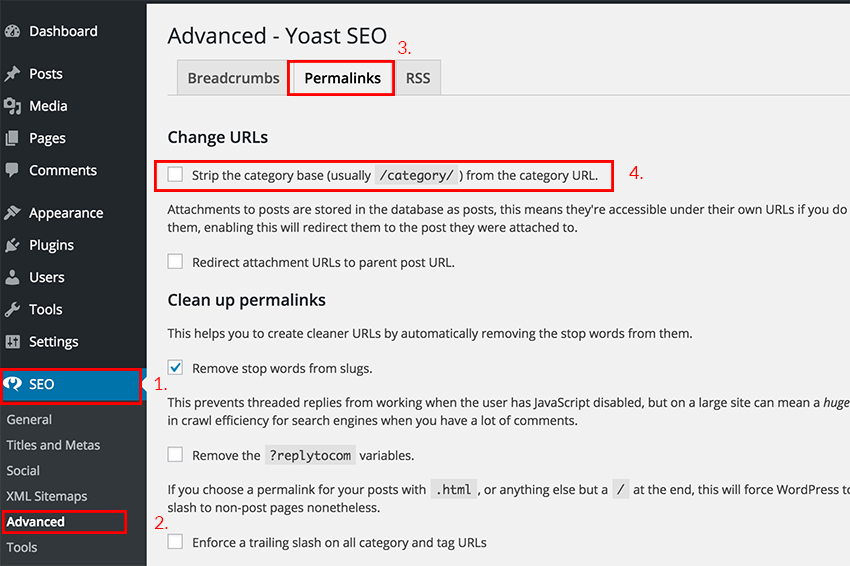
removing category from urls plugin

To remove the category base manually in the .htaccess file just add this line of code.

RewriteRule ^category/(.+)$ http://www.site.com/$1 [R=301,L]

This plugin also removes the category base and seems to be very popular as well. I would recommend this method the least because too many plugins will slow your website down and require you to keep more plugins up to date. https://wordpress.org/plugins/remove-category-url/

remove category plugin

Conclusion

All four methods above will work for removing the category slug from your URLs. Although I would recommend choosing the method that is going to use less code in your case.

Leave a Reply

Your email address will not be published. Required fields are marked *

top

Inactive

Simplifying IT
for a complex world.
Platform partnerships